Building a Smarter Partner Experience with Liferay

Introduction
Partner portals can hold everything a partner needs and still make simple tasks harder than they should be. A reseller looking for a product guide may search through documents, promotions, training, and support resources, while another partner may see the same content despite having a different role, region, product focus, or tier.
The problem comes down to relevance. Partners need the right information quickly, and the portal needs enough context to understand what matters to them.
A more effective approach brings Liferay DXP, Elasticsearch, semantic search, and personalization together to make partner portals easier to search, use, and maintain.
A Partner Trying to Find One Simple Answer
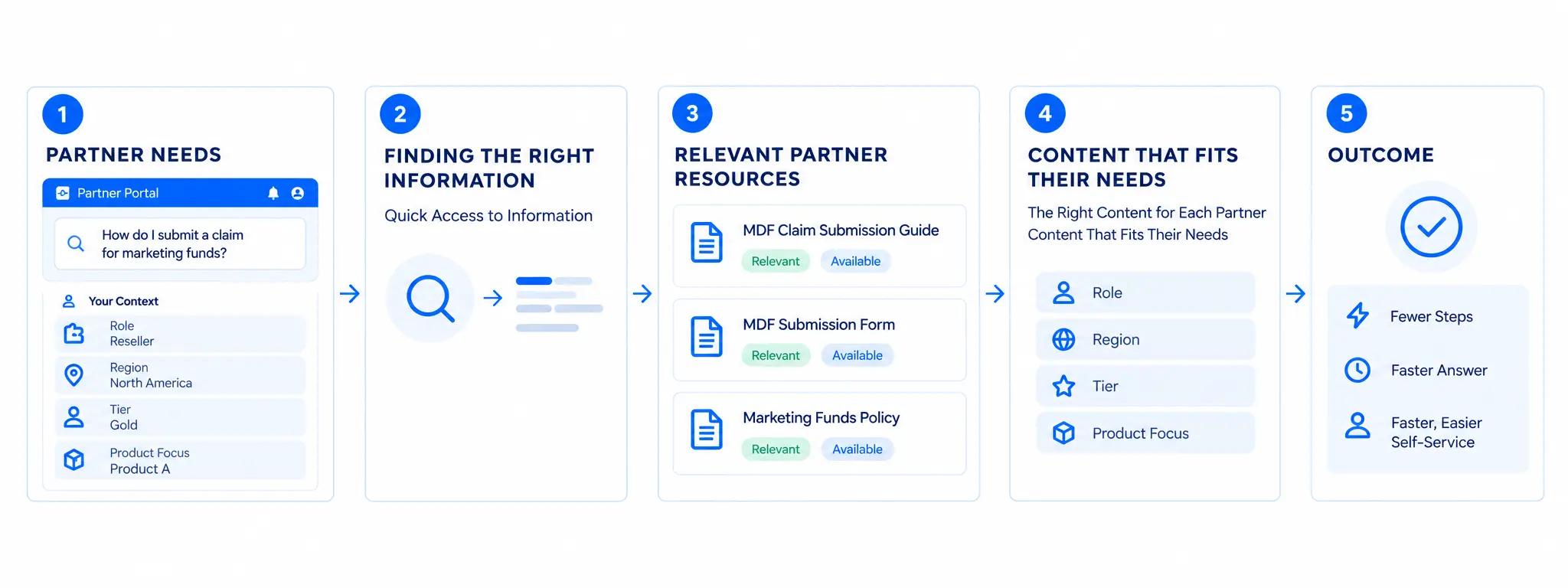
Consider a partner looking for the latest marketing development funds claim process. They search, “How do I submit a claim for marketing funds?”
A basic keyword search may miss the relevant “MDF Claim Submission Guide” or rank it lower, forcing the partner to try different terms, browse categories, or contact their account manager.
With the right context, the experience becomes more relevant. The portal can understand who the partner is, what they need, and what they can access, helping them reach the right information with fewer steps. The result is faster access to relevant resources and an easier self-service experience.
| The practical question: Can the portal help a partner find the right resource without making them work out how the organization has named or organized that resource? |
|---|
What the Experience Actually Needs
A more relevant partner portal experience brings four capabilities together. Each one has a clear job, and this is how each capability works together.
| Capabilities | What it does? |
|---|---|
| Liferay DXP | Provides the portal, user context, content, roles, and permissions. |
| ElasticSearch | Helps users find the right information faster. |
| Semantic Search | Helps users find what they need, even when they phrase their questions differently. |
| Personalization | Delivers a more relevant experience based on each partner’s needs. |
The value comes from connecting these capabilities: search finds relevant content, personalization adds partner context, and semantic search extends IGNEK’s Liferay and Elasticsearch foundation by helping the portal understand natural-language intent and surface relevant content.
From Search Query to Relevant Partner Content
Take the earlier MDF example. This is where partner portal search needs to do more than match keywords.
First, the query is interpreted as a request about submitting an MDF claim. The system can then identify related content even where the wording differs.
Next, Elasticsearch searches the indexed content for relevant resources. This could include an MDF claim guide, approval process, submission form, or related policy.
Liferay applies the partner's permissions so the search experience only exposes content the user is allowed to access.
Personalization can then make the results more useful. A partner in a particular region or tier may have different MDF rules, forms, or resources from another partner.
The partner sees a shorter, more relevant path to the information they need.
The same approach can support other partner tasks:
- Finding documentation for a specific product line
- Locating training or certification resources
- Finding current promotions
- Checking partner program information
- Accessing sales enablement material
- Finding support or service resources
In each case, the goal is the same: connect what the partner is asking for with the content and context that matter to them.
Getting the Solution Right
The technology alone does not guarantee useful results. Several design decisions matter from the start.
- Relevant content: Keep information well organized and easy to find. Group resources by factors such as product, region, partner tier, or content type.
- Up-to-date information: Keep partner-facing information current, especially pricing, product details, policies, and program guidance.
- Right access: Make sure partners only see the information relevant and available to them based on their role or organization.
- Relevant experiences: Tailor content and resources to different partner needs. Keep the rules simple enough to manage as the portal grows.
- Useful results: Test the portal with real partner questions and improve areas where users struggle to find what they need.
Where to Start
It is not necessary for organizations to completely revamp a partner portal.
Finding a few high-friction partner journeys is a useful place to start. Look at the searches that generate support requests, the content partners struggle to find, and the areas where different partner groups need different information.
- Audit the existing content and search experience.
- Identify the partner attributes that should influence access and relevance.
- Define the content, metadata, and indexing model.
- Design the search and personalization flow.
- Start with a focused use case and measure how partners use it.
- Expand the approach based on what the data and feedback show.
This also gives teams a way to introduce improvements without changing the entire portal in one release.
Conclusion
The largest shift is evident in routine tasks: partners spend less time searching for information and more time using relevant content, results, and dashboards that reflect their needs. When a portal understands both the inquiry and the partner behind it, the experience becomes more useful. Liferay DXP, Elasticsearch, semantic search, and personalization provide the foundation, with the value coming from applying them to the partner journeys that matter most.
IGNEK helps organizations design and build Liferay-based partner portal solutions around real partner journeys, content, access requirements, and business processes.
| Explore the approach. If your partner portal contains the right information but partners still struggle to find or use it, the first step is to examine the search, content, and personalization experience together. |
|---|


